
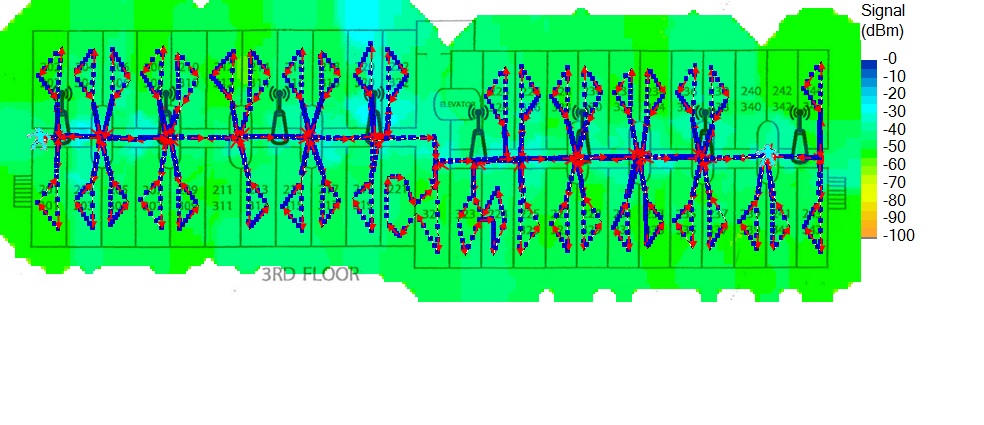
I’ve hung access points in hotels with a couple hundred rooms, in steel farm buildings, and in plenty of ordinary houses. The question I hear most is some version of “how far will it reach?” It’s the wrong question. Wi-Fi range isn’t a spec you can read off the box. It’s whatever your building, your access point, and the cheap radio in your phone work out among themselves, and the datasheet has never seen your building. Here are the mental models I actually use when I plan coverage, whether the job is a hotel floor or the barn 400 feet behind my house.
Wi-Fi Range Is a Two-Way Conversation
The first idea to fix in your head: a wireless link only works if both ends can hear each other. An access point can be built with strong amplifiers and high-gain antennas and push its signal a long way. Your phone can’t push back. It’s running a tiny radio off a battery, held at hip height, sometimes buried in a pocket.

That’s why “long-range” routers disappoint so reliably. Out at the edge of coverage your phone still shows a bar or two, because it hears the AP fine. But pages crawl and calls drop, because the AP can’t hear the phone. The usable range of any wireless network is set by its weakest transmitter, and that’s almost always the client device. When I plan a hotel floor, I don’t design around the AP’s capabilities. I design around the oldest, cheapest phone a guest might pull out at the far end of the hallway.
The Building Is the Spec Sheet
Here’s something that surprises people: every Wi-Fi vendor works from roughly the same power budget. In the US, the FCC’s Part 15 rules for unlicensed devices cap how loud a radio is allowed to be, so nobody is selling you a legally louder transmitter. They’re selling better antennas, better software, and better marketing. Which means the variable that decides your coverage isn’t the AP you bought. It’s the structure you bolt it to.
Some rough numbers from my own installs, all with the same class of gear. Outdoors with clear line of sight, a decent AP is still usable at 300 feet or more. In a typical wood-and-drywall house, one well-placed AP covers 1,500 to 2,000 square feet without drama. In a 1960s hotel poured from concrete and block, I plan on an AP being useful about two guest rooms in either direction down the hall, and I assume nothing survives crossing two block walls. Same radio, three wildly different answers. The building is the spec sheet.
What Actually Eats Your Signal
Indoors, coverage is really a question of what sits between the AP and the device:
- Drywall and wood framing shave a little signal off per wall. Two or three interior walls are usually fine.
- Brick, block, and old plaster hit much harder. The plaster-and-lath walls in older western PA farmhouses often hide a layer of wire mesh, which behaves like a screen door for radio waves.
- Poured concrete with rebar is the hotel killer. Floors and shear walls in mid-century buildings will flatten a strong signal in one hop, which is why hospitality Wi-Fi is dense by design.
- Metal is a wall, full stop. A steel pole barn is effectively a Faraday cage. I learned early that an AP mounted outside a barn, aimed at the door, covers a sliver of the interior at best. The fix is always an AP inside the building.
- Water absorbs 2.4 and 5 GHz well. People, aquariums, and trees are mostly water. I’ve watched a farm wireless link that ran flawlessly all winter degrade every spring when the treeline leafed out.

If you want the physics underneath all of this (why signals bend, bounce, and fade the way they do), I wrote a deeper explainer on how Wi-Fi signals actually propagate.
The Band Tradeoff: Reach vs. Speed
Frequency is the other half of the story. As a rule, lower frequencies travel farther and punch through walls better; higher frequencies carry more data but give up sooner. In practice: 2.4 GHz will reach the far corner of the house and a good way across the yard, but it’s slow and crowded. 5 GHz is fast and clean but loses noticeably more to every wall. 6 GHz is fantastic in the same room as the AP and mediocre one wall away.
On the farm, that tradeoff is very visible. A 2.4 GHz signal from the house will still move data at an outbuilding 200 feet away through some trees; 5 GHz at that distance is a coin flip. If you’re not sure which band your devices should live on, I’ve covered how to pick between 2.4, 5, and 6 GHz in its own post.
More Transmit Power Isn’t More Range
The most common mistake I see in home setups (and inherit in hotel takeovers) is every radio cranked to maximum transmit power. Remember the two-way conversation: turning the AP up doesn’t make your phone any louder, so past a point you’re just extending the zone where the connection looks good and performs badly.

In multi-AP buildings, high power actively hurts. Phones cling to the distant AP they first joined instead of roaming to the closer one, and every guest at the far end of that hallway suffers for it. In hotel deployments I almost always turn 2.4 GHz power down to force clean roaming. If you run UniFi gear at home, transmit power, minimum data rates, and band steering are all covered in my guide to advanced UniFi Wi-Fi settings.
How I’d Plan Your Coverage
Here’s the practical version of everything above:
- Stop thinking in range; think in AP count. One AP per floor or per 1,500 to 2,000 square feet of framed house, placed centrally and up high, beats any single “long-range” unit shouting from a corner.
- Wire the backhaul where you can. An Ethernet run to a second AP is worth more than any antenna upgrade you’ll ever buy.
- Walk-test with a phone, not the router’s app. Aim for roughly -65 dBm in the spots that matter; by -75 you’re in dropped-video territory.
- For outbuildings, use a point-to-point bridge. A pair of $100 directional radios put solid Wi-Fi in my barn 400 feet from the house. No consumer router will manage that through 400 feet of air and metal siding.
- Keep APs out of closets, basements, and metal racks. You’d be surprised how many “weak Wi-Fi” complaints end with a router sitting behind a furnace.

None of this is exotic. Coverage is a plan, not a number you buy. Figure out what your walls are made of, count the rooms that actually have to work, and design for the cheapest phone that will ever connect. That phone is the one setting the rules.
